Television Buying Guide

Television Buying Guide
As a new television buyer, you might be surprised by the number of various options available. This TV selection guide addresses many important factors to consider. The product descriptions are full of different technical terms, which is why we want to clarify the meanings of the most common abbreviations. Therefore, read the TV buying guide before heading out to shop. The television buyer's guide is made for you. It will help you more easily decide which television to purchase for your home.
What Size TV?
The appropriate screen size depends on how far the viewing location is from the television. It is also worth considering the type and size of the surface on which the television will be placed. The perfect viewing distance allows the viewer to see the entire screen and ensures that events are easy to follow. Different televisions have different pixel counts, which is why a new television should always be matched to the viewing distance.

Calculating Viewing Distance and Screen Size
The ideal viewing distance can be calculated using the screen resolution and the screen size. Generally, the size of the television is given in inches. One inch is 2.54 centimeters. With the examples below, you can estimate what the ideal viewing distance is for your televisions.
Full HD
- 45" = about 1.8 m viewing distance
- 55" = about 2.2 m viewing distance
- 65" = about 2.6 m viewing distance
UHD
- 45" = about 1.4 m viewing distance
- 55" = about 1.7 m viewing distance
- 65" = about 2.0 m viewing distance
Full HD Television:
Screen size in meters x 1.6 = suitable viewing distance
UHD Television:
Screen size in meters x 1.2 = suitable viewing distance
Resolution – Full HD and UHD
Full HD, or high definition, indicates that the screen resolution reaches 1920 x 1080 pixels. The letter P at the end of the numbers does not indicate the number of pixels but rather "Progressive Scan," which minimizes flickering of the image.
UHD stands for Ultra High Definition. The UHD term is also known as 4K television, which has four times the resolution of Full HD televisions. This means there are about 4000 pixels vertically on the screen. UHD expresses the screen's resolution, meaning the higher the resolution of the TV, the sharper and brighter the image it can produce. The difference is most apparent in television models with large screen sizes. It is important to note that image quality is determined by the quality of the content. Currently, there is a limited amount of 4K content available on the market, but the standard is becoming more widespread.
HDR and HDR 10+
HDR stands for High Dynamic Range, which translates to a wide dynamic range. Almost all new, higher-priced televisions utilize HDR technology. This technology allows for greater contrast in images. This ensures that the shades of black and white are reproduced more accurately. HDR technology also provides a wider color spectrum and more realistic images.
HDR 10+ is a dynamic metadata platform for high dynamic range images established by Panasonic, Samsung, and 20th Century Fox. This feature brings higher contrast and smoother shading. You can elevate your home theater experience. The metadata platform processes each scene individually and dynamically handles metadata to convey realistic contrasts and colors. To make this possible, tone mapping is adjusted for each individual scene rather than the entire film.

Smart TV and Entertainment Services
New televisions nowadays are almost all smart TVs. A Smart TV resembles a computer in its features. A television powered by smart technology connects to your home Wi-Fi network or via an Ethernet cable to the router, allowing access to various streaming services and applications. Almost all smart TVs come standard with YouTube and Netflix, and many can stream their 4K content as well. Domestic applications such as Katsomo, Ruutu, and YLE Areena are also available. Examples of smart televisions include Android TV, Samsung Tizen, and LG webOS. During the purchasing stage, consider the applications and features of the smart TV, as availability can vary by brand. Alternatively, you can upgrade your television to a smart TV by purchasing a separate media player, such as Apple TV.
Tuners
Televisions receive broadcasts via antenna, cable, satellite, or IPTV networks. Among these, cable and antenna are the most common. The antenna network currently often utilizes the DVB-T2 technology, which enables viewing HD channels. The technology is still relatively new, and the complete transition is set for 2020. Therefore, it is advisable to purchase a TV with a DVB-T2 tuner or an Antenna Ready HD marking beforehand for antenna households. Cable channels can be viewed as long as the television is equipped with a DVB-C tuner. For HD channels, the television needs to have either a DVB-C HD tuner or a Cable Ready HD marking.
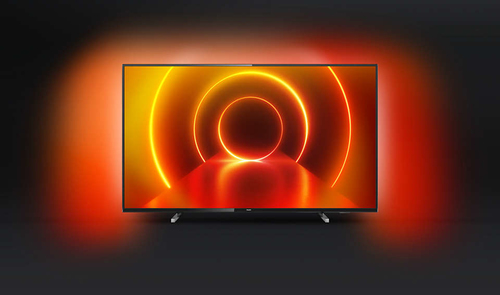
Ambilight
Ambilight comes from the words Ambient Lighting, which refers to surrounding light. The Ambilight technology can be found in Philips televisions, where light reflected around the television expands the events on the screen. The technology's purpose is to help create a more impactful viewing experience. Ambilight technology automatically adjusts the color and intensity of the light based on the content. The light can be adjusted according to the room's decor or mood. Our selection includes models where the light is placed on two, three, or four sides of the television. Ambilight televisions can synchronize with Philips Hue smart lighting, allowing for dimming functions and various scheduling options. This way, you can get the most out of your Ambilight televisions.
Television Connections
When selecting a new TV, it is advisable to consider the number and quality of the television's connections and tuners. Different connections allow for the attachment of various devices, such as speakers and gaming consoles. Therefore, it is good to check the different connection types and their availability before purchasing a television. Televisions should ideally have a comprehensive number of connections to ensure there is enough room for additional devices in the future.

Television Sound
Audio playback is a significant part of the television experience, especially in connection with movies and games. Televisions often have built-in speakers, but almost always, the experience improves with external speaker systems. If desired, you can purchase a multi-channel home theater system or connect stereo speakers to the television. The connection types for audio systems are generally HDMI, optical toslink, or analog RCA. If you want to create a home theater, it is advisable to acquire a home theater receiver along with a surround system that has at least 6 or preferably even 8 speakers. This also requires suitable interior solutions to ensure the best possible home theater experience.
Soundbar is a convenient option for complementing your television. It is a surround system in a compact form. The system includes multiple speaker elements for producing surround sound. It can also connect to external devices, such as gaming consoles. Many soundbars include upward-firing speakers for enabling Dolby Atmos sound. It is advisable to purchase your television and soundbar from the same manufacturer for convenient control with a single remote control.

Television Calibration
The picture quality of a new television is not perfect on the first startup. Calibrating the television allows for the best possible picture quality. Through calibration, the television's contrast, gray levels, and colors can be adjusted to what the material's manufacturer intended. Calibration services can be ordered separately for specific models at the time of purchasing or ordering the television. Read more about television calibration.

Explore Our Range of Televisions
Discover Euronics' comprehensive selection of televisions and smart TVs. You will find various size options categorized:
We are happy to assist you in choosing the right TV for you. Welcome to be served at your nearest Euronics store! Find out the location of your nearest Euronics store.
Euronics - Best Local Service